Master Kubernetes Helm-Charts
Why do we need Helm-Charts ? While we having manifests files ?
Running single-single manifest files is soo boring and dealing with multiple files will be come hard.
Example:
kubectl apply -f deployment.yml
kubectl apply -f configmap.yml
kubectl apply -f secret.yml
kubectl apply -f service.yml
So can we keep all the manifest files in one folder and can trigger one simple command so that manifest file will get deployed ?
This is what helm will do it for you
What is Helm ?
Helm is a package manager for the kubernetes applications and templatize the manifest files.
Helm installation
sudo dnf install helm -y
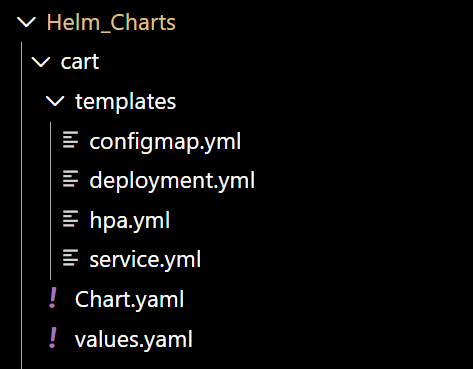
Helm Structure
Helm Commands
helm install <chart_name> <directory>
This command will run the all manifests files in the templates folder of that particular chart .
helm upgrade <chart_name> -f values-dev.yaml --set service.targetport="80"
This command will run the all manifests files of particular chart and applies the values present in the values-dev.yaml file and sets the service.targetport to 80.
We can change the values form the command line as well.
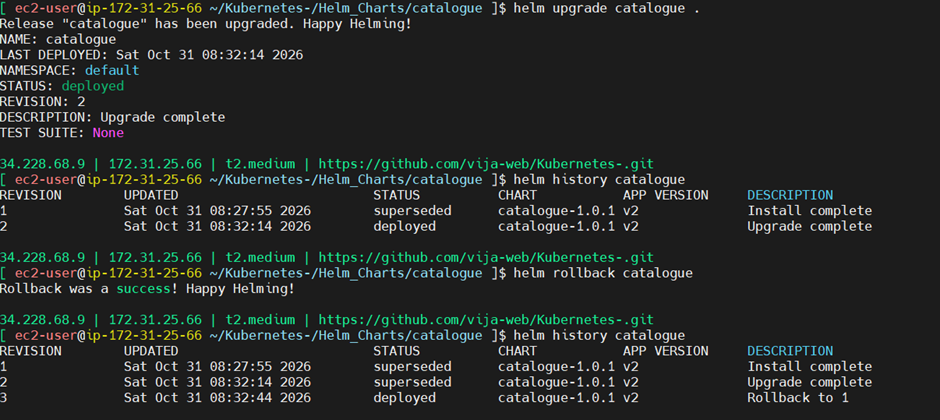
helm rollback <chart_name>
Rollback to the previous revision
helm rollback <chart_name> 1
Rollback to the 1st version , if we want to rollback to specific version
helm list
Lists the all charts available
helm uninstall <chart_name>
You can delete the all the resources created in the cluster.
helm history <chart_name>
Gives the entire history of the chart and tells you currently which version was running in the cluster.
helm status <chart_name>
shows what all resources created for the last install / upgrade
How Helm works ?
When you enter the helm install cart . then it will check which cluster is currently pointed too ?
Then it underhood converts to the manifest files and does the kubectly apply -f <file_name>
So if we having multiple clusters then how can we change to another ?
kubectl config get-contexts
This command shows the currently which cluster was pointed too
CURRENT   NAME              CLUSTER
*         dev-cluster       dev-cluster
          test-cluster     test-cluster
          prod-cluster     prod-cluster
kubectl config use-context test-cluster
This command points to the dev-cluster
helm install roboshop ./roboshop
--kube-context dev-cluster
You can pass directly in the helm command as well
helm install roboshop ./roboshop
-f values-dev.yaml
--kube-context dev-cluster
You can pass the values-dev.yaml file also
Note:
we should change the appVersion and the version in the chart.yml file while upgrading , because we will have the clear picture on the deployments when we do helm history <chart_name>
GitHub: https://github.com/vija-web/Kubernetes-/tree/master/Helm_Charts
Thank you !
Happy Helming !
Comments
Join the discussionNo comments yet. Be the first to comment.