Master Kubernetes RBAC ( Role Based Access Control )
RBAC
Role Based Access Control , If you want to give the least privileged access to your kubernetes resources then you should implement the RBAC for your project with resources like Role , RoleBinding , ClusterRole , ClusterRoleBinding.
First , Create the EKS Cluster The person who has access to the Cluster creation can create the cluster basically K8S Admin.
Then create IAM ( Identity Access Management ) User and create policy providing cluster describe permission for the specific cluster by providing cluster arn. Now attach the policy created to the IAM User.
So , Now the user just can view the cluster details like what was the cluster name , ARN of the cluster , which region cluster was present like these details.
Now , Generate the Access key and Secret key for the IAM user created and share to the user.
Now admin should set the authentication and authorization for the IAM user created.
kubectl get configMap aws-auth -n kube-system -o yaml
apiVersion: v1
kind: ConfigMap
metadata:
  name: aws-auth
  namespace: kube-system
data:
  mapUsers: |
    - userarn: arn:aws:iam::337222561122237:user/vijay
      username: vijay
      groups:
        - trainee
You can add the user arn and username in the aws-auth configMap file.
Why this file is needed means eks don't know who is actually requesting the resources because when user hits kubectl get pods -n roboshop with this command kubectl sends the temp token by contacting aws.So now eks received the token and the command kubectl get pods -n roboshop , But it does not know the token belongs to which user ? So eks asks to the IAM which user is holding the token ? IAM replies like this arn:aws:iam::337222561122237:user/vijay but eks don't know exactly which user so eks checks the which user is mapped to this arn in the aws-auth.yml file and then check for the access he having and accordingly reponds if know access error , If access is granted then gives the output for the command kubectl get pods -n roboshop.
This is reason we required the aws-auth file , Basically for the authencation purpose.
Architecture Diagram
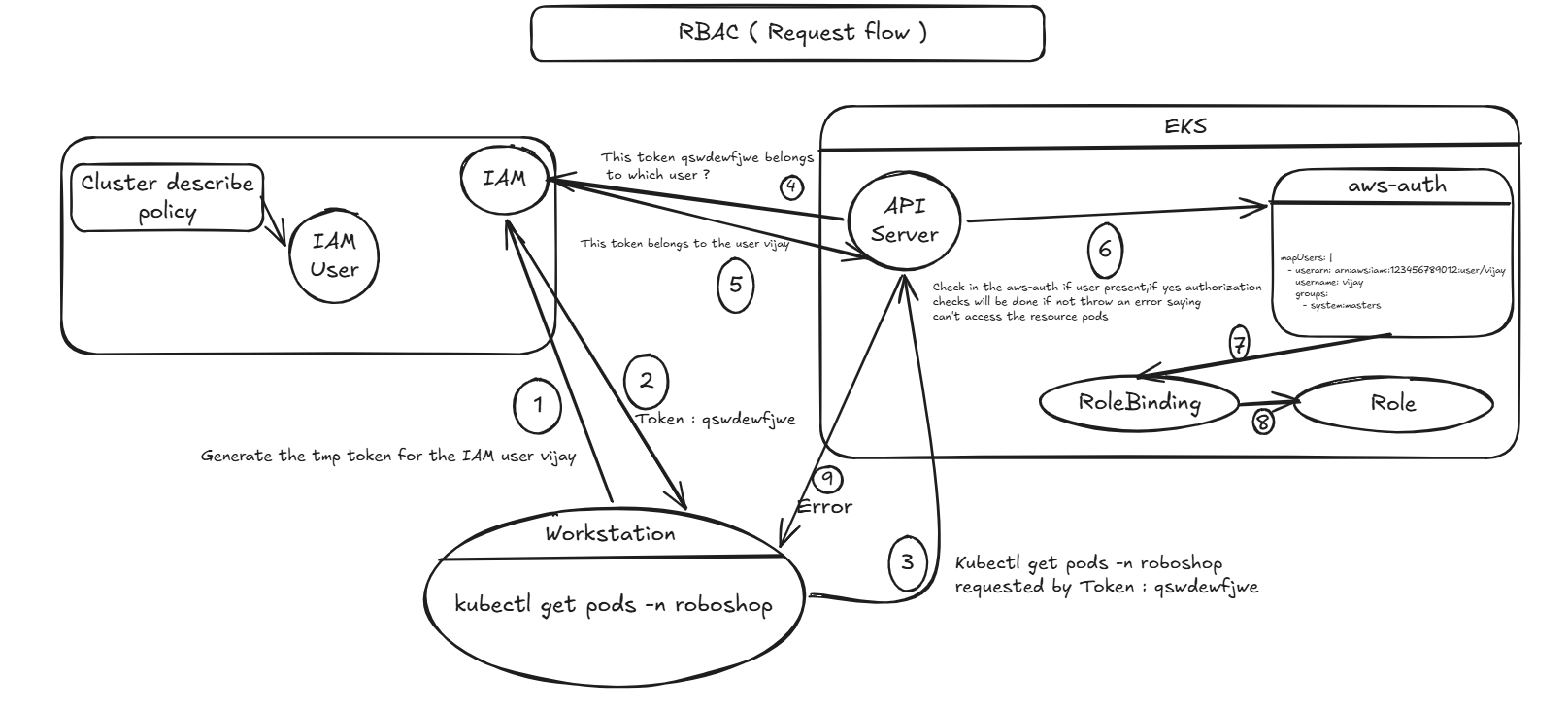
Now , Authentication was done We need to provide the authorization to the user vijay.
We need to know before providing the access something like which role ? , which apigroup ?, which resource ?, what actions ?
NameSpace Level:
Role Creation
apiVersion: rbac.authorization.k8s.io/v1
kind: Role
metadata:
  name: trainee
  namespace: roboshop
rules:
  - apiGroups: [""] # all core groups
    resources: ["pods", "services", "configmaps"]
    verbs: ["get", "list", "watch"]
RoleBinding
apiVersion: rbac.authorization.k8s.io/v1
kind: RoleBinding
metadata:
  name: trainee-role-binding
  namespace: roboshop
subjects:
  - kind: User
    name: vijay
    apiGroup: rbac.authorization.k8s.io
roleRef:
  kind: Role
  name: trainee
  apiGroup: rbac.authorization.k8s.io
Cluster Level :
ClusterRole
apiVersion: rbac.authorization.k8s.io/v1
kind: ClusterRole
metadata:
  name: admin
rules:
  - apiGroups: ["*"] # all core groups
    resources: ["*"]
    verbs: ["*"]
ClusterRoleBinding
apiVersion: rbac.authorization.k8s.io/v1
kind: RoleBinding
metadata:
  name: admin-role-binding
subjects:
  - kind: User
    name: vinay # vijay your wish , That user will get permissions
    apiGroup: rbac.authorization.k8s.io
roleRef:
  kind: ClusterRole
  name: admin
  apiGroup: rbac.authorization.k8s.io
Managing Groups :
Role
apiVersion: rbac.authorization.k8s.io/v1
kind: Role
metadata:
  name: trainee
  namespace: roboshop
rules:
  - apiGroups: [""] # all core groups
    resources: ["pods", "services", "configmaps"]
    verbs: ["get", "list", "watch"]
RoleBinding
apiVersion: rbac.authorization.k8s.io/v1
kind: RoleBinding
metadata:
  name: trainee-role-binding
  namespace: roboshop
subjects:
  - kind: Group   # Here you will mention as group
    name: trainee
    apiGroup: rbac.authorization.k8s.io
roleRef:
  kind: Role
  name: trainee
  apiGroup: rbac.authorization.k8s.io
aws-auth
# we manage the groups in the aws-auth.yml
# Used for authencation purpose with IAM

apiVersion: v1
data:
  mapRoles: |
    - rolearn: arn:aws:iam::3377536545557:role/eksctl-roboshopcluster-nodegroup-c-NodeInstanceRole-6Wn1a8Fl2EZL
      groups:
      - system:bootstrappers
      - system:nodes
      username: system:node:{{EC2PrivateDNSName}}
  mapUsers: |
    - userarn: arn:aws:iam::3377536545557:user/vijay
      username: vijay
      groups:
        - trainee
    - userarn: arn:aws:iam::3377536545557:user/mohan
      username: mohan
      groups:
        - trainee
    - userarn: arn:aws:iam::3377536545557:user/anil
      username: anil
      groups:
        - trainee  # This will get evalauated
kind: ConfigMap
metadata:
  creationTimestamp: "2026-11-01T02:51:39Z"
  name: aws-auth
  namespace: kube-system
  resourceVersion: "1215"
  uid: 52bwdwqdqd
Now the authentication and authorization was done we will say to the user configure the credentials and execute some commands.
- aws configure
- aws eks update-kubeconfig --region us-east-1 --name <cluster-name>
- aws sts get-caller-identity
- kubectl api-resources
- Now if user hit the command kubectl get pods -n roboshop then he will get the output.
Output

GitHub: https://github.com/vija-web/Kubernetes-/tree/master/RBAC
Thank You !
Vijay.
Comments
Join the discussionNo comments yet. Be the first to comment.